Creating Automations With N8N
Creating Automations With N8N
Project Overview
Project Overview
During my internship at KPMG India, our creative team faced a critical challenge: the friction between deep work and the need to stay updated with rapid-fire AI trends. We needed a way to accelerate our pipeline without adding cognitive load.
To solve this, I designed an ecosystem of autonomous agents using low-code tools like n8n and Make.
My focus wasn't just on 'saving time', it was on designing invisible interfaces that curated intelligence, generated content, and streamlined operations. This project transformed our workflow from a reactive manual process into a proactive, AI-driven system.
During my internship at KPMG India, our creative team faced a critical challenge: the friction between deep work and the need to stay updated with rapid-fire AI trends. We needed a way to accelerate our pipeline without adding cognitive load.
To solve this, I designed an ecosystem of autonomous agents using low-code tools like n8n and Make.
My focus wasn't just on 'saving time', it was on designing invisible interfaces that curated intelligence, generated content, and streamlined operations. This project transformed our workflow from a reactive manual process into a proactive, AI-driven system.
Role
Role
AI Design Intern
AI Design Intern
Timeline
Timeline
May 2025 - Nov 2025
May 2025 - Nov 2025
Tools
Tools
Figma, N8N, Make, Zappier, Opal, Lovable, Replit, Github Copilot
Figma, N8N, Make, Zappier, Opal, Lovable, Replit, Github Copilot
Project Showcase
Project Showcase
The Problem: Information Overload Creative teams often spend 30-45 minutes daily "doom-scrolling" to find relevant news for content or research. This context switching kills productivity and flow state.
The Solution: The "Morning Briefing" Agent I architected a self-healing workflow in n8n that functions as a virtual Chief of Staff. Instead of a human manually searching for news, the system runs autonomously while the team sleeps.
The Problem: Information Overload Creative teams often spend 30-45 minutes daily "doom-scrolling" to find relevant news for content or research. This context switching kills productivity and flow state.
The Solution: The "Morning Briefing" Agent I architected a self-healing workflow in n8n that functions as a virtual Chief of Staff. Instead of a human manually searching for news, the system runs autonomously while the team sleeps.
How does it work and core understanding of the flow
How does it work and core understanding of the flow
Daily News Update
Daily News Update
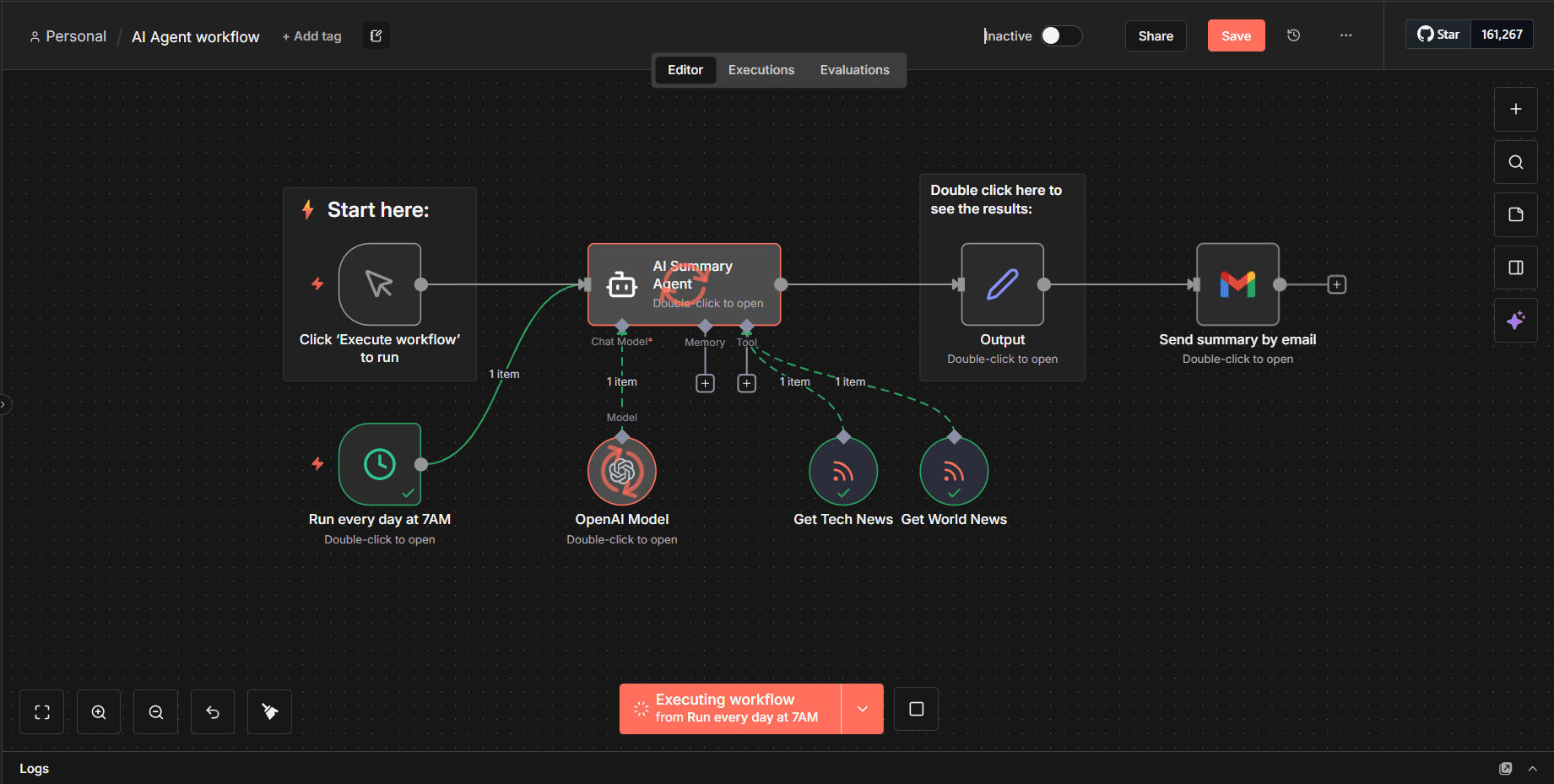
How it Works (The Workflow):
Multi-Modal Ingestion: The agent triggers every morning at 7:00 AM, scraping high-signal RSS feeds (TechCrunch, Design Week) and News APIs.
Cognitive Synthesis (The AI Brain): An OpenAI node doesn't just "summarize"—it is prompted to act as a Lead Strategist. It filters out noise, categorizes updates by "Critical" vs. "Nice to Know," and synthesizes the data into actionable insights.
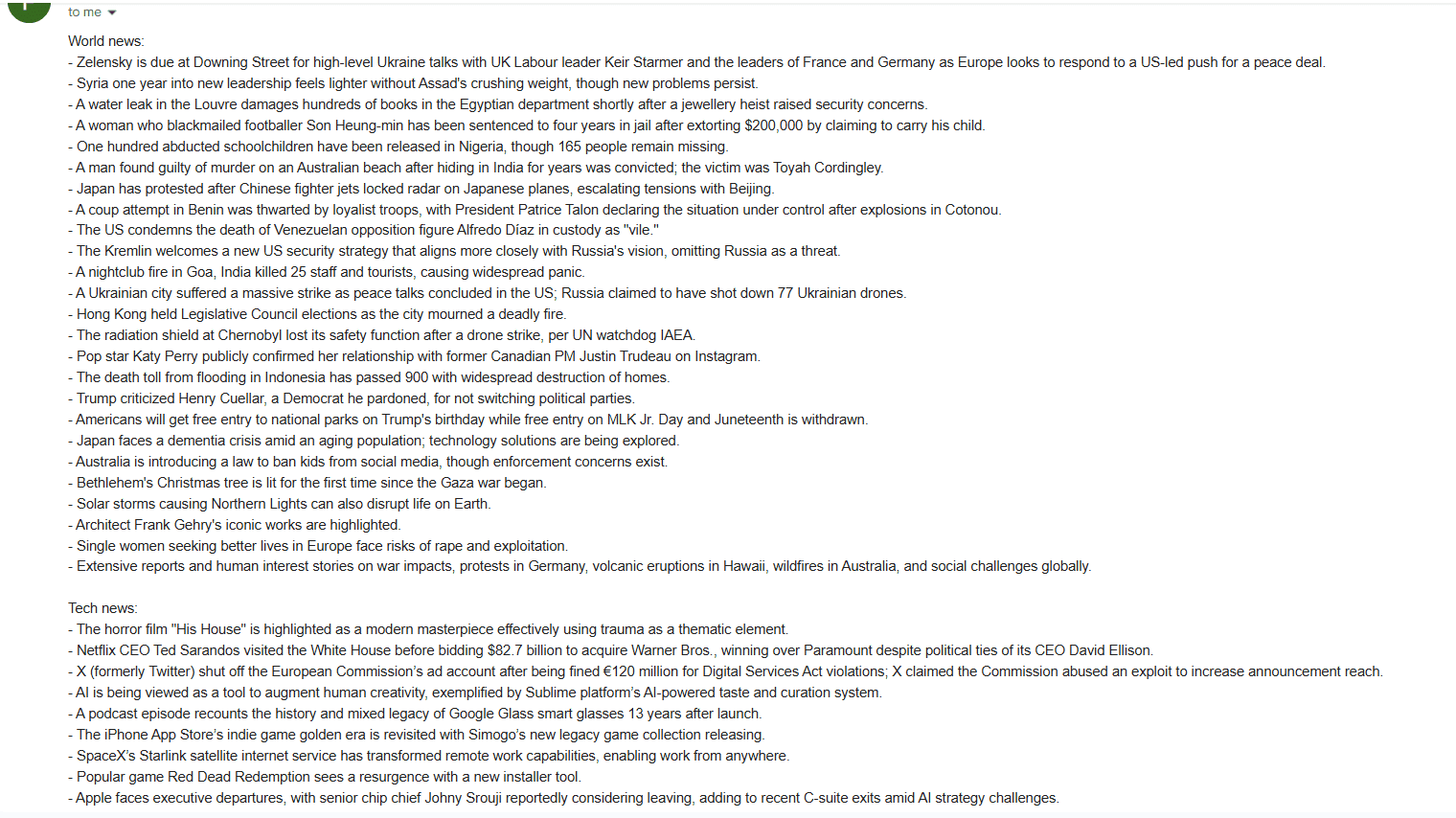
Frictionless Delivery: The output is formatted into a clean, scannable HTML digest and emailed directly to the team's inbox. No logins, no dashboards—just pure value delivered where they already are.
How it Works (The Workflow):
Multi-Modal Ingestion: The agent triggers every morning at 7:00 AM, scraping high-signal RSS feeds (TechCrunch, Design Week) and News APIs.
Cognitive Synthesis (The AI Brain): An OpenAI node doesn't just "summarize"—it is prompted to act as a Lead Strategist. It filters out noise, categorizes updates by "Critical" vs. "Nice to Know," and synthesizes the data into actionable insights.
Frictionless Delivery: The output is formatted into a clean, scannable HTML digest and emailed directly to the team's inbox. No logins, no dashboards—just pure value delivered where they already are.
Understanding the Node with reason
Understanding the Node with reason
The AI Agent Node
The AI Agent Node
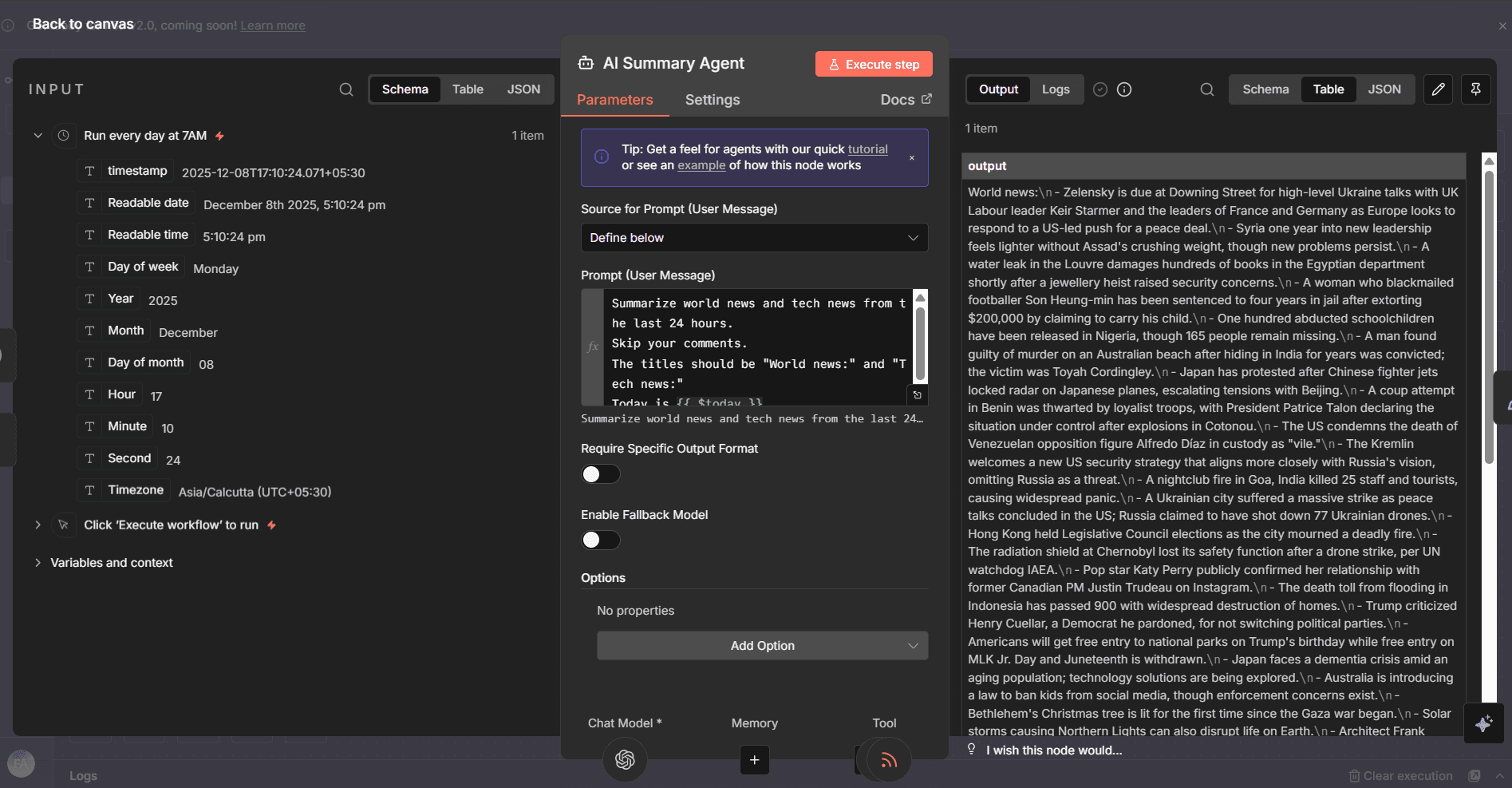
The Cognitive Core: Designing the "Brain"
This node is the intelligence center of the workflow. I configured the AI Summary Agent to act not just as a summarizer, but as a curator.
Prompt Engineering: I crafted a strict system prompt instructing the model to filter for 'high-impact' news only, stripping away clickbait and celebrity gossip.
Context Management: By chaining specific RSS inputs (Tech & World News), I ensured the model operates within a controlled context window, reducing hallucinations and keeping the output strictly relevant to professional design trends.
The Cognitive Core: Designing the "Brain"
This node is the intelligence center of the workflow. I configured the AI Summary Agent to act not just as a summarizer, but as a curator.
Prompt Engineering: I crafted a strict system prompt instructing the model to filter for 'high-impact' news only, stripping away clickbait and celebrity gossip.
Context Management: By chaining specific RSS inputs (Tech & World News), I ensured the model operates within a controlled context window, reducing hallucinations and keeping the output strictly relevant to professional design trends.
Understanding the Node with reason
Understanding the Node with reason
The Output Node
The Output Node
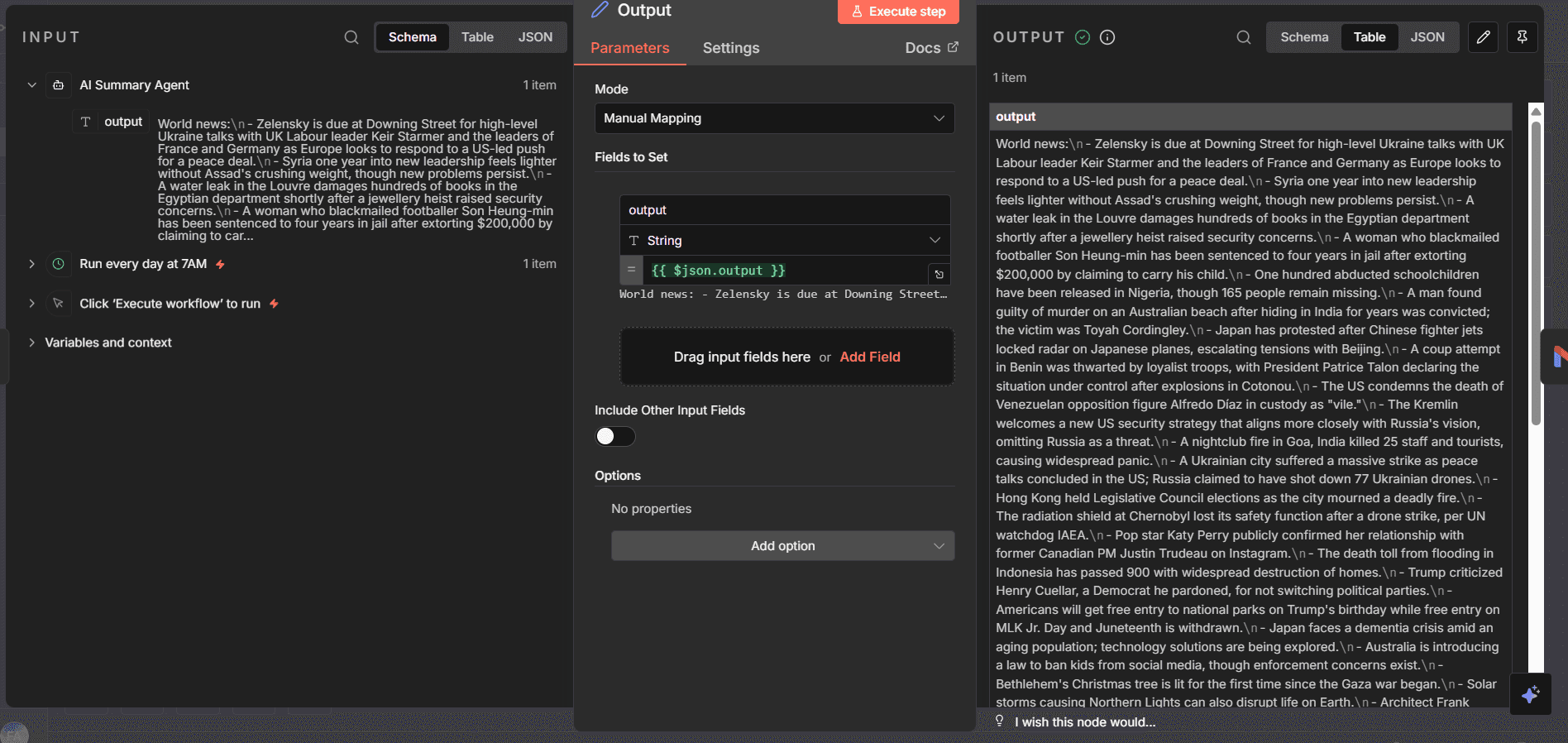
Data Transformation: Structuring the Unstructured
Raw AI output is often messy. This Output/Code Node serves as the translation layer between the LLM and the final interface.
Data Mapping: I manually mapped the JSON output from the AI agent into a structured string format.
System Logic: This step ensures that regardless of how long or short the AI's generation is, the final data packet is always clean, error-free, and ready for transmission. It acts as a quality assurance gate in the autonomous loop.
Data Transformation: Structuring the Unstructured
Raw AI output is often messy. This Output/Code Node serves as the translation layer between the LLM and the final interface.
Data Mapping: I manually mapped the JSON output from the AI agent into a structured string format.
System Logic: This step ensures that regardless of how long or short the AI's generation is, the final data packet is always clean, error-free, and ready for transmission. It acts as a quality assurance gate in the autonomous loop.
Understanding the Node with reason
Understanding the Node with reason
The Gmail Summary Node
The Gmail Summary Node
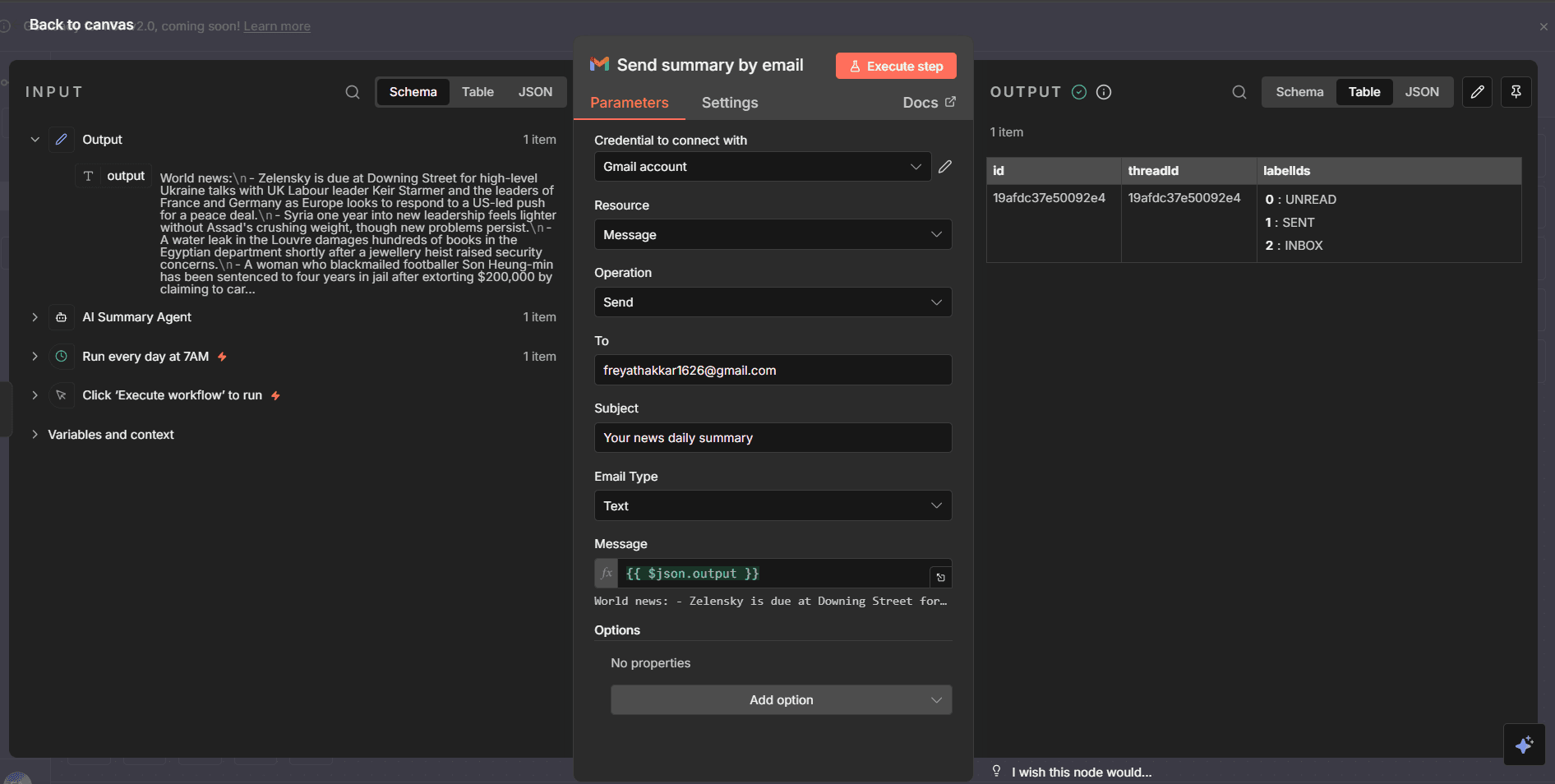
The Delivery Layer: Frictionless Experience
The best interface is no interface. Instead of forcing the team to log into a dashboard, I used the Gmail Node to push insights directly to their existing workflow.
Zero-Friction UI: The 'Subject' and 'Body' are dynamically populated using variables from previous nodes.
Automation: By hardcoding the recipient list and scheduling the trigger for 7:00 AM, the system creates a habit-forming product experience delivering value before the user even asks for it.
The Delivery Layer: Frictionless Experience
The best interface is no interface. Instead of forcing the team to log into a dashboard, I used the Gmail Node to push insights directly to their existing workflow.
Zero-Friction UI: The 'Subject' and 'Body' are dynamically populated using variables from previous nodes.
Automation: By hardcoding the recipient list and scheduling the trigger for 7:00 AM, the system creates a habit-forming product experience delivering value before the user even asks for it.
Impact & Results
Impact & Results
Time Saved: Reclaimed approximately 15 hours/month per team member by automating research and draft generation.
Velocity: Reduced the "Idea-to-LinkedIn Post" cycle from 4 hours to 20 minutes using automated content drafting agents.
Engagement: Ensured the team never missed a critical AI update, directly influencing our design strategy for client pitches.
Time Saved: Reclaimed approximately 15 hours/month per team member by automating research and draft generation.
Velocity: Reduced the "Idea-to-LinkedIn Post" cycle from 4 hours to 20 minutes using automated content drafting agents.
Engagement: Ensured the team never missed a critical AI update, directly influencing our design strategy for client pitches.
Conclusion
Conclusion
This project was a pivotal moment in my transition from a traditional interaction designer to an AI Systems Designer.
It demonstrated that in the age of AI, 'User Experience' is no longer limited to screens and pixels. The most powerful interfaces are often invisible working autonomously in the background to remove friction before the user even notices it.
Building this agent taught me that Systems Thinking is the new Design Thinking. By treating the n8n workflow as a design artifact with its own logic, constraints, and user flows—I was able to create a tool that didn't just 'do tasks,' but actually 'bought time' for creativity.
Moving forward, I see Agentic Workflows not as a replacement for designers, but as the ultimate scaffolding that allows us to focus on high-leverage strategic work rather than repetitive data entry.
This project was a pivotal moment in my transition from a traditional interaction designer to an AI Systems Designer.
It demonstrated that in the age of AI, 'User Experience' is no longer limited to screens and pixels. The most powerful interfaces are often invisible working autonomously in the background to remove friction before the user even notices it.
Building this agent taught me that Systems Thinking is the new Design Thinking. By treating the n8n workflow as a design artifact with its own logic, constraints, and user flows—I was able to create a tool that didn't just 'do tasks,' but actually 'bought time' for creativity.
Moving forward, I see Agentic Workflows not as a replacement for designers, but as the ultimate scaffolding that allows us to focus on high-leverage strategic work rather than repetitive data entry.